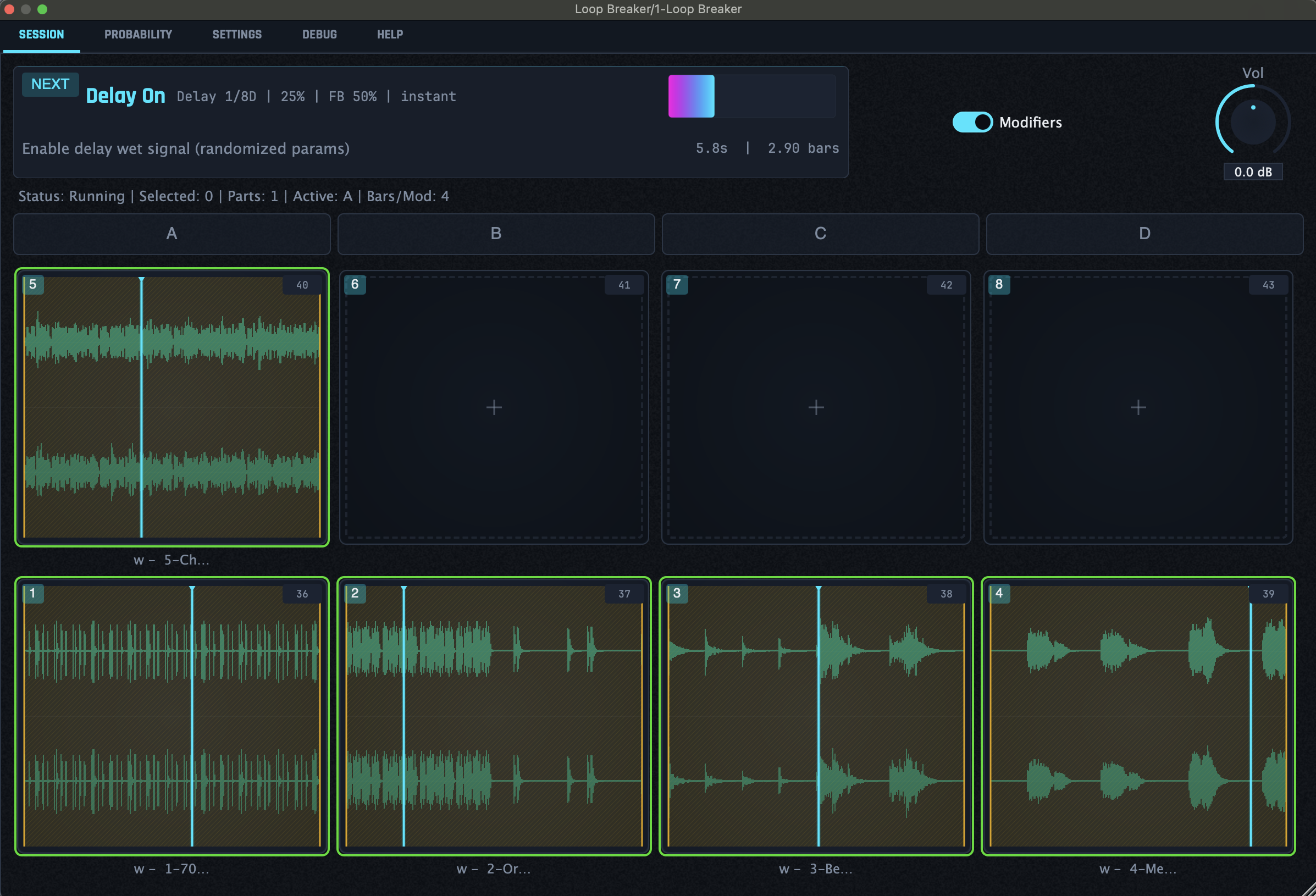
Every few bars, Loop Breaker presents a modifier and lets you choose which loops it affects. If you make no choice, Loop Breaker will assign modifiers to pads for you. The only constant is change.
Available as a free download.
Load your loops, press play, and decide how they change as the track develops.
Drop up to eight loops into the pad grid: drums, vocals, textures, or a whole idea in pieces.
Every few bars, a new modifier enters the queue: an effect, a slice, a reversal, a stretch, or something stranger.
Pick the loops it should affect. Make no choice, and Loop Breaker selects pads for you.
Modifiers stack. Within minutes, each loop will head down its own path before the pieces recombine into something new.
Effects, playback changes, and structural edits can be applied as you play, with as much manual or automatic control as you want.
Set how many bars - or how much time - should pass between modifiers.
Control how likely each modifier is to appear and how likely each loop is to be chosen when you cede the decision.
Reverse, re-pitch, stretch, change speed, ping-pong, move between parts, or slice loops into shuffled, arpeggiated, and repeated fragments.
Reverb, delay, chorus, filters, granular delay, auto-pan, and tremolo receive changing settings and onset times on the fly.
Use MIDI CC or DAW automation lanes to change the odds while the loops are running.
Store a state as a preset, take your exploration further, then recall it when you need it.
Map pads and presets to MIDI notes, put probabilities on faders, and make decisions with your hands instead of the mouse.
Send each loop to its own stereo channel in your DAW, then keep editing, processing, and mixing after the fact.
Reset returns a loops to its original state, ready for the next set of surprises.
A modifier comes up every few bars. Assign it to a loop or leave the decision to Loop Breaker. Either way, the changes stack.
Loop Breaker follows your DAW's tempo and transport. Its probability sliders respond to MIDI CC, DAW automation lanes, and modulation sources, so you can keep changing the rules midstream or build meta-compositions using pre-mapped probability changes.
Save and recall modifier stacks as presets. Your loops, mappings, timing, and probability settings also return with the DAW session.
| Property | Value |
|---|---|
| Format | VST3 AU |
| Category | Instrument (Synth) |
| MIDI Input | Yes |
| Outputs | 9 stereo buses (18 ch) |
| Sample Formats | WAV AIFF FLAC MP3 |
| Platform | macOS 10.13+ (Intel & Apple Silicon) |
| Manufacturer | Glow Machine Audio |
Pads, presets, and probability settings can all be mapped to MIDI. Pull a fader to make granular delay more likely, switch a preset, or leave the next choice to the plugin.